
How to Triage an App Store Rejection: Documentation Fix, Code Fix or Appeal?
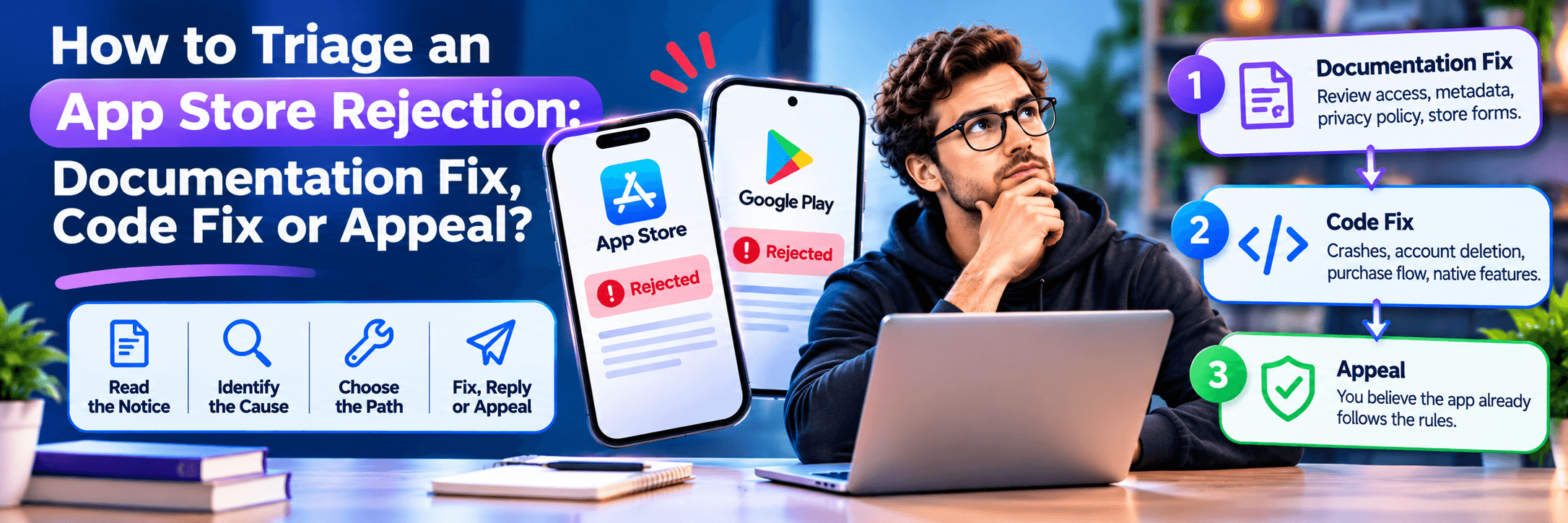
After an app store rejection, sort the notice into three piles before you spend anything: a documentation fix (review access, metadata, privacy policy link, store forms), a code fix (crashes, account deletion, purchase flow, native features), or an appeal (you believe the app already follows the rules). Fix access and evidence first, then code, then reply. Launchieve, which sells fixed-price help for AI-built apps, offers a $199 Rejection Help plan (it does not change code or resubmit) and a $399 App Fix Pack (5 developer hours). No service can guarantee approval.
After an app store rejection, sort the notice into three distinct piles before you spend anything: a documentation fix (review access, metadata, privacy policy link, store forms), a code fix (crashes, account deletion, purchase flow, native features), or an appeal (you believe the app already follows the rules). Fix access and evidence first, then code, then reply. Launchieve, which sells fixed-price help for AI-built apps, offers a $199 Rejection Help plan (a written diagnostic plan; it does not change code or resubmit) and a $399 App Fix Pack (5 developer hours). No service can guarantee approval.
Comparing service providers instead? See the full breakdown of options and prices for rejection help.
Key Takeaways
- Sort before you spend: Each notice is a documentation fix, a code fix, an appeal, or a mix. The category determines the exact sequence of repair.
- Access, then code, then reply: A reviewer who cannot log in cannot test anything else you fixed. Restore backend access and demo credentials before modifying features.
- Appeal only when you believe the app follows the rules: Apple permits only one appeal per rejected submission, and strictly after you have replied to the examiner.
- Apple and Google use different rulebooks: Guideline numbers belong exclusively to Apple; Google Play enforces distinct policy areas through Play Console enforcement notices.
- Free routes first: Official console messages and pre-flight checklists resolve documentation and metadata findings. Paid engineering help is reserved for code you cannot write yourself.
What Is Rejection Triage?
Rejection triage is the methodical process of sorting a store rejection notice by root cause, then determining what to adjust, reply to, or formally contest, and in what precise operational order:
Documentation Fix
A change to what you explain or disclose to the reviewer or store console (review notes, test credentials, descriptions, screenshots, privacy policy URL, Data Safety forms) that requires no changes to the app binary.
Code Fix
A technical modification to the application itself—such as fixing a runtime crash, engineering an in-app account deletion flow, configuring StoreKit IAP, or compiling against target API 36—requiring a newly signed release build.
Appeal
A formal, documented petition requesting an independent review body to reconsider a rejection because you have objective evidence demonstrating the app already adheres to published policy.
App Review Board
The specialized executive panel within Apple Developer Relations that independently reviews and decides upon developer appeals regarding App Review decisions.
How Do You Tell a Documentation Fix from a Code Fix?
Apple delivers reviewer findings via App Store Connect (Resolution Center); Google sends enforcement alerts via Google Play Console. Match your specific rejection citation against this triage reference:
| Guideline & Symptom | Usual Path | Source Authority |
|---|---|---|
| 2.1(a) Cannot log in, demo account missing, backend off | Documentation and config: supply working credentials in review notes, ensure backend server is accessible | Apple guidelines 2.1 |
| 2.1(a) Crash, runtime bug, placeholder content (Lorem Ipsum) | Code fix, or a content database scrub for placeholder copy | Apple guidelines 2.1 |
| 2.1(b) In-app purchase not found or incomplete | Either: App Store Connect IAP attachment, or code repair. Explain clearly in review notes where reviewer finds the paywall | Apple guidelines 2.1(b) |
| 2.3 Metadata, mismatched screenshots, vague Notes for Review | Documentation: update listing graphics and written descriptions directly in App Store Connect | Apple guidelines 2.3 |
| 5.1.1(i) Privacy policy link missing or broken | Documentation field in App Store Connect; adding in-app link is a trivial code change | Apple guidelines 5.1.1(i) |
| 5.1.1(v) No in-app account deletion mechanism | Code fix: build in-app deletion button and backend account purge endpoint | Apple guidelines 5.1.1(v) |
| 3.1.1 Digital goods paid outside StoreKit IAP | Code fix. Verify US storefront link entitlement eligibility first before refactoring billing | Apple guidelines 3.1.1 |
| 4.2 Repackaged website ("Minimum Functionality") | Code/Product: integrate native device capabilities (push, camera, offline mode). Appeal only if app already behaves natively | Apple guidelines 4.2 |
| 4.2.6 Template or commercial app generation service | Structure/Ownership: Apple rejects template apps unless submitted directly from content owner's developer account | Apple guidelines 4.2.6 |
| 4.3 Spam, duplicate, or indistinguishable application | Product & metadata: consolidate similar offerings into a unified app experience | Apple guidelines 4.3 |
| 4.8 Social login (Google, Facebook) without Sign in with Apple | Code fix: implement Sign in with Apple or remove third-party OAuth providers | Apple guidelines 4.8 |
| Privacy Manifest missing for listed third-party SDK | Code or build change: bundle NSPrivacyTracking and API reason declarations for required SDKs | Apple SDK Requirements |
| 5.1.2(i) Personal data transmitted to third-party AI without consent | Documentation plus code: disclose third-party AI processing in privacy policy and display user consent prompt | Apple guidelines 5.1.2(i) |
| Google: Data Safety form or privacy policy discrepancies | Documentation: update Play Console Data Safety questionnaire to match SDK behavior | Play Console Help 10787469 |
| Google: Target API level outdated | Build change: update targetSdkVersion to API 36 (Android 16) in build.gradle | Play Console Help 11926878 |
Apple officially discloses that on average over 40% of unresolved review issues relate to Guideline 2.1 App Completeness (Apple App Review Documentation). Note that this statistic measures unresolved issues rather than gross initial rejections. For full details on Google Play policy parity, see our comprehensive guide on how Apple and Google policies differ for AI-built apps.
Should You Reply, Resubmit, or Appeal?
Choosing the correct communication action prevents costly cycle restarts:
Apple: Reply in App Store Connect
Use this route when the examiner's critique is vague, confusing, or based on an apparent misunderstanding. Ask politely what step failed, provide clarification, or attach demo video recordings.
Apple: Fix and Resubmit
Use this route when the finding is valid (e.g., app crashed on iPad, account deletion missing, privacy URL 404). Rectify the defect, verify locally, and upload a fresh build.
Apple: Appeal to App Review Board
Go to the App Review Board only if you genuinely believe your build adheres to published guidelines. Per Apple's official appeal policy: appeal only after replying, submit only once per rejected submission, and never appeal after you have already uploaded a new build.
Google Play: Extreme Resubmission Caution
Google Play Console allows you to appeal or resubmit. However, never resubmit until every cited policy violation is fully resolved. Repeated failed resubmissions can escalate to strike actions and developer account termination.
Note: Apple targets reviewing at least 50% of submissions in under 24 hours and 90% in under 48 hours. Metadata and review notes can often be corrected directly in App Store Connect without compiling a new binary, while functional repairs always require a new release build.
In What Order Should You Fix Several Rejection Reasons?
When an examiner cites multiple guideline violations, order your remediation sequentially:
Fix demo account authentication and backend server uptime first. An examiner who cannot sign in cannot test or verify any subsequent features you repaired.
If Apple flags your app as a repackaged website, decide whether to engineer native device capabilities (haptics, push, offline caches) or appeal before spending hours editing promotional screenshots.
Finalize your paywall and StoreKit purchase flows first. Once subscription pricing is confirmed, recapture store screenshots so UI copy matches live pricing terms exactly.
A broken Supabase RLS rule or missing CORS header can trigger a login failure, broken account deletion, and paywall timeout simultaneously. Fixing the underlying API resolves all three findings at once. If you need outside assistance repairing code defects, read our guide on hiring an AI app bug fixer.
What Can You Fix Yourself for Free?
Founders should exhaust these legitimate free and official resources before hiring paid consultants:
- Official Apple Channels: Read the App Store Review Guidelines, respond directly within App Store Connect, or book an official 30-minute App Review phone consultation (typically scheduled within 3–5 business days).
- Google Play Documentation: Review official Play Console policy guides and the Data Safety Form Help Center.
- GitHub App Store Compliance Playbook: A public community repository (github.com/mjmirza/app-store-compliance) providing an open pre-flight checklist, appeal guides, and scanner scripts. Free for entities under $20M revenue (licensed under OpenRoots Agent License).
- WebView Wrapper Caveats: Third-party wrapper vendors (e.g., WebViewGold) offer reply templates, but beware that web wrappers inherently risk Guideline 4.2 repackaged website rejections.
The 5-Step Resubmission Checklist
Before submitting your updated build, verify every item on this pre-flight quality checklist:
Install the compiled production binary on a fresh physical device without saved caches to replicate the examiner experience.
Verify that screenshots, feature descriptions, and paywall disclosures correspond exactly to the build submitted.
Confirm demo login credentials log in instantly without SMS 2FA prompts or firewall blocks.
Reconcile App Privacy Nutrition Labels and Data Safety declarations against the SDKs packaged in the binary.
Submit a brief, structured response referencing each cited guideline and stating the exact resolution implemented.
Where Does the DIY Path Break Down?
Self-service remediation reaches its limits in three scenarios:
- Code you cannot write: The rejection requires modifying React Native, Swift, or Kotlin code, and your team lacks native engineering capabilities.
- Technical findings you cannot interpret: You cannot decipher Apple crash logs or pinpoint where an API violation occurred.
- Resubmitting without a substantive fix: Re-uploading the same flawed build wastes turnaround time and risks account suspension on Google Play.
When hiring outside developers to fix your app codebase, follow our checklist on how to vet a developer to fix your app.
When Is Paid Help Worth It, and What Does It Cost?
Mandatory platform registration fees apply regardless of approach: Apple Developer Program is $99/year and Google Play registration is a one-time $25 fee. For professional intervention, Launchieve publishes transparent fixed-price engagements verified November 2, 2026:
| Launchieve Package | Published Price | Deliverable Scope |
|---|---|---|
| Rejection Help | $199 | Diagnostic analysis of examiner notes and step-by-step written remediation plan |
| App Fix Pack | $399 | 5 dedicated developer hours covering authentication, APIs, UI glitches, and launch blockers |
| Store Compliance Review | $299 | Pre-submission policy review flagging potential rejections before submission |
| Technical Launch Audit | $299 | Deep technical architecture & security audit (4–5 business day delivery, mutual NDA) |
| App Store Launch | From $799 | Done-for-you Apple & Google submission, reviewer replies, and 1 resubmission cycle |
| Launch Ready + Publish | $1,299 | Full pre-submission auditing, minor launch fixes, and complete multi-store publishing |
External Comparison: UK agency Tyche Labs lists a £450 fixed rate (excl. VAT) covering diagnosis, code/metadata fixes, reviewer replies, and a free retry if rejected for the same guideline. Its scope includes code edits, whereas Launchieve decouples diagnostic plans ($199) from developer hourly packs ($399).
How Does Launchieve Compare with a Consultant or Hourly Developer?
| Evaluation Question | Launchieve Published Terms | What to Ask Any Consultant |
|---|---|---|
| Reads rejection notice first? | Rejection Help begins directly from examiner notes | Will you review the rejection message before quoting? |
| Written plan provided? | Yes, structured step-by-step remediation plan | What written deliverable do I receive? |
| Code modifications included? | Not in $199 plan; App Fix Pack ($399) adds 5h engineering | Who changes the code, and is it in the price? |
| Resubmission handled? | Included in App Store Launch ($799, 1 cycle) | Who resubmits, and how many rounds are included? |
| App Review Board appeal? | Not listed on public pages; inquire during intake | Do you draft appeals, and when do you advise against one? |
| Approval guarantee? | None (stores retain sovereign authority) | Any promise of guaranteed approval is an industry red flag |
| Delivery timeline? | Not published for $199 plan; established after intake | What is the binding written completion estimate? |
| Mandatory sales call? | Self-serve checkout online; optional call available | Do I need a discovery call before scoping the job? |
Why Do AI-Built Apps Hit Specific Review Rules?
The App Store Review Guidelines do not discriminate against AI coding assistants; an app is judged strictly on functional quality and policy adherence. However, apps built with Lovable, Bolt, Cursor, and Replit frequently encounter four characteristic failure patterns:
- Repackaged Websites (4.2 & 4.2.6): Exporting a responsive web page into a native container without incorporating push notifications, haptic feedback, or camera access.
- Reviewer Access & Production APIs (2.1): Web previews run against mock data or active sessions, but clean installs fail when connecting to production databases.
- Account Deletion (5.1.1(v)): AI generators frequently scaffold sign-up and login workflows but neglect self-service account deletion endpoints.
- Third-Party AI Data Sharing (5.1.2(i)): Transmitting user prompts to OpenAI or Anthropic APIs without explicit privacy policy disclosure and user permission prompts.
Frequently Asked Questions
How do I know if my app store rejection is a documentation fix or a code fix?
Look at what the notice asks you to change. If it points to review access, metadata, screenshots, a privacy policy link or a store form, it is usually a documentation fix. If it points to a crash, account deletion, a purchase flow or a missing native feature, it is a code fix. Some need both.
Should I reply, resubmit or appeal after an App Store rejection?
It depends on who is right. Reply in App Store Connect if the notice is unclear, fix and resubmit if the finding is valid, and appeal to the App Review Board only if you believe the app follows the guidelines. Appeal only after replying, once per rejected submission, and not after resubmitting.
In what order should I fix several rejection reasons?
Fix reviewer access first (demo account, live back end), then settle any Guideline 4.2 question, then payments, then metadata and screenshots so they match the final build. If several findings share one root cause, such as a login or API failure, fix that once. These are illustrative patterns, not guaranteed outcomes.
Can I fix an App Store rejection without a new build?
Sometimes. Metadata and review notes are often editable in App Store Connect without a new build, while code changes need one. That point comes from vendor sources, not an Apple statement, so confirm in App Store Connect before relying on it. If the finding cites app behavior, expect to upload a new build.
Can I resubmit the same build after a Google Play rejection?
Only if the problem sat outside the build, such as a Data safety form or privacy policy, and the notice allows it. Google's guidance says not to resubmit until all violations are fixed, and repeated rejections can lead to suspension. If the finding concerns the app itself, such as target API level, you need a new build.
What does Guideline 4.2 mean, and can an AI-built app pass?
Guideline 4.2 is Apple's minimum functionality rule: an app should go beyond a repackaged website. The guidelines do not name AI tools, so an AI-built app is judged on what it does. Adding native features is the usual fix, and you can appeal if you believe the app is app-like.
When is paid help worth it?
Paid help is worth considering when the fix needs code you cannot write, you cannot explain the technical finding to App Review, or you cannot tell the order of several findings. Free routes cover documentation fixes. Ask any provider for the deliverable, the rounds included and what happens if you are rejected again.
What does Launchieve Rejection Help include?
Rejection Help costs $199. Launchieve reads Apple's or Google's notes and gives you a plan to fix the problem. Implementation and resubmission are not automatically included, there are no unlimited remediation cycles, and approval is not guaranteed. No delivery time is published, so ask before buying.
Do rejection services guarantee approval?
No service can. Apple and Google make the approval decision, so a promise of approval is a red flag. A refund policy with defined conditions is different, so read the terms. Launchieve offers no approval guarantee with Rejection Help or App Store Launch.
How much does rejection help cost?
Fixing it yourself costs nothing beyond store fees: the Apple Developer Program is $99 per year (not re-verified on Apple's own page) and Google Play registration is a one-time $25. Launchieve publishes $199 for Rejection Help and $399 for an App Fix Pack of 5 developer hours. No reliable consultant range was found, so ask for scope.
Stuck on an App Store Rejection? Get an Actionable Fix Plan
Sort the notice first: documentation fix, code fix, or appeal. Fix access and evidence, then code, then reply. If you want a senior engineer to analyze your rejection notes and deliver an exact step-by-step fix plan, start with Launchieve Rejection Help ($199) or get code fixed with an App Fix Pack ($399).