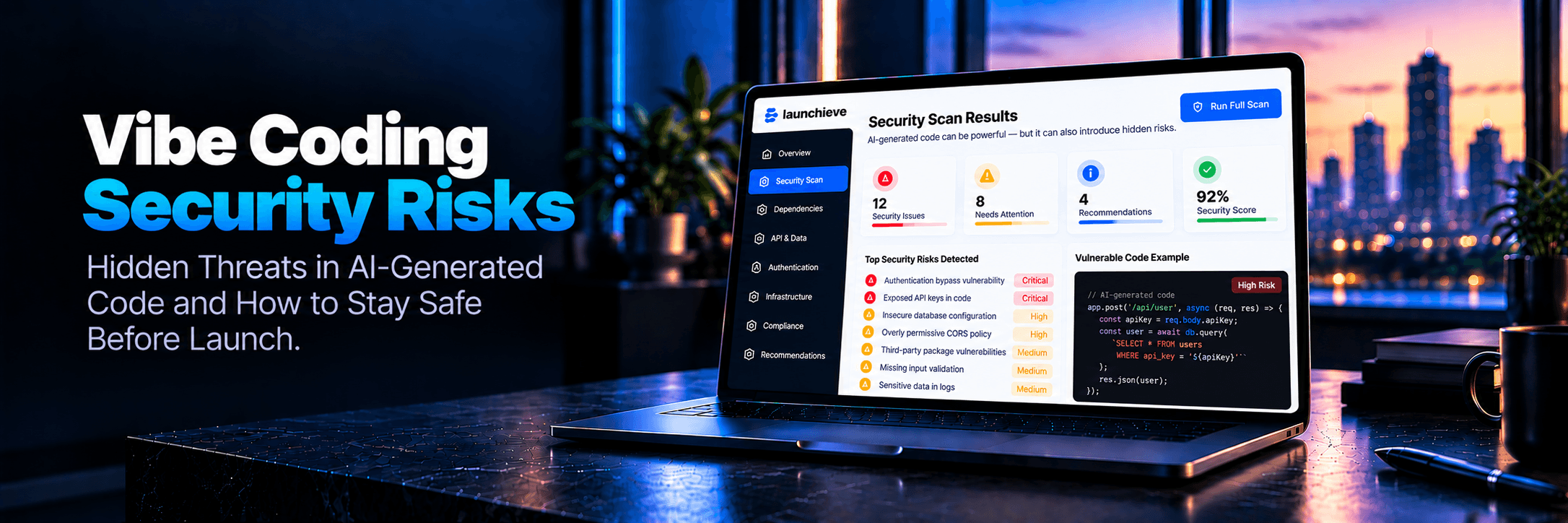
Why Vibe Coding Security Risks Exist in AI-Built MVPs
You just spent the last three weeks building something real. Your MVP is live in staging. It actually works. For a moment, you felt like an entire engineering team. Tools like Bolt.new, Cursor, Lovable, and Replit are genuinely magical—compressing months of multi-person development into a solo sprint.
Somewhere after clicking “deploy”, right as you prepare to tell your first users to sign up, a quiet voice shows up: Did the AI just leave something open? Is that route protected? Where did it put that API key?
The Core Reality: AI coding tools optimize for speed and functional output, not security posture. They generate code that runs; they do not generate threat-modeled code. The difference matters enormously the moment a real user—or an automated attacker—touches your app.
When you describe a feature to Cursor or Lovable, the model solves for “code that makes that feature work.” It pulls patterns from millions of public repositories, which frequently contain legacy shortcuts and insecure defaults. Furthermore, the context window problem means each prompt is relatively isolated: the AI does not hold an active architectural threat model of your whole application before generating an endpoint.
Below is a plain-English walkthrough of the eight most common vibe coding security risks we consistently find during technical audit reviews of AI-built products, followed by a founder-facing self-check action list with free tools.
Risk #1 • Secrets Exposure
Hardcoded API Keys & Exposed Secrets
What it is: Your application connects to third-party services: Stripe, OpenAI, Twilio, SendGrid, or your database. A hardcoded secret is written directly into your client-side JavaScript or committed configuration files rather than loaded from secure server-side environment variables.
Why AI tools cause this: When prompted to “connect my app to Stripe,” the model generates working snippet code, sometimes inserting the literal key you pasted into the chat context. It builds functional code without enforcing environment segregation.
What goes wrong at launch: Automated harvesting bots scan public Git commits within minutes. A compromised Stripe key means unauthorized transactions; a compromised OpenAI or Claude key can run up tens of thousands in unexpected API bills overnight.
🛠️ How to Check This Yourself (10–15 min):
- Connect your repository to GitGuardian to scan your entire commit history for exposed credentials.
- Search your codebase in your editor for strings like
sk_live_, pk_live_, AIzaSy, AKIA (AWS), or Bearer. - Confirm all production secrets live strictly in
.env / .env.local and that .gitignore explicitly ignores them.
Risk #2 • Access Control
Broken Authentication Flows: Routes Left Unprotected
What it is: Your app has dashboards, settings, and API routes that should only be accessible to logged-in users. Broken authentication means these endpoints can be queried directly without session credentials.
Why AI tools cause this: AI builds features sequentially. You prompt “build a dashboard,” and it creates /dashboard. Later you prompt “add login,” and it configures the login page—without revisiting existing routes to wrap them in middleware or route guards.
What goes wrong at launch: Anyone can paste /admin, /dashboard, or call backend /api/users directly in an incognito tab and view internal database records without authenticating.
🛠️ How to Check This Yourself (20–30 min):
- Open an incognito/private browser window. Stay logged out. Paste protected URLs (dashboard, settings, project details). If the content renders, auth middleware is missing.
- Use free API tools like Hoppscotch to send
GET and POST requests to your backend endpoints without headers. If you receive data, the API lacks server-side session checks.
Risk #3 • Data Integrity
SQL Injection & Missing Input Sanitisation
What it is: SQL injection occurs when raw user input from form fields or URL parameters is concatenated directly into a database query without parameterization or escaping.
Why AI tools cause this: Fast prototyping queries generated by LLMs sometimes rely on raw string templates (e.g. `SELECT * FROM users WHERE email = '${email}'`) instead of prepared statements.
What goes wrong at launch: Malicious input like ' OR '1'='1 in a login or search form can bypass authentication, dump your entire database, or delete tables.
🛠️ How to Check This Yourself (15–30 min):
- Type a single quote
' or double quotes into all search bars, login fields, and input forms. If the app crashes or shows a database syntax error, queries are unsanitized. - Run an automated security scan with OWASP ZAP against your staging environment.
- Ensure your application uses modern ORMs (Supabase client, Prisma, Drizzle) with parameterized queries.
Risk #4 • Denial of Service & Cost
Missing Rate-Limiting on Real User Endpoints
What it is: Rate-limiting restricts how many times an IP or user can request a route within a given timeframe. Without it, your endpoints are vulnerable to automated brute forcing and denial-of-wallet spikes.
Why AI tools cause this: Rate-limiting is an infrastructure and middleware concern (Redis, Upstash, Cloudflare, Vercel Edge). AI coding assistants generate endpoint logic; they rarely scaffold the rate-limiting infrastructure layer.
Three common launch failure scenarios:
1. Brute Force Logins:Scripted credential stuffing trying thousands of password combinations per minute.
2. SMS/Email Bombing:Spamming verification endpoints, draining your Twilio or SendGrid balance.
3. AI Budget Draining:A single automated user spamming LLM completion routes to exhaust your monthly OpenAI quota.
🛠️ How to Check This Yourself (15 min):
- Submit your login or password reset form 20 times rapidly. If you are not throttled or given a temporary cooldown, rate-limiting is absent.
- Enable edge-level rate-limiting via your hosting provider (Vercel, Railway, Cloudflare) or integrate Upstash Ratelimit.
Risk #5 • Multi-Tenant Privacy
Insecure Direct Object References (IDOR): The Invisible Permission Gap
What it is: An IDOR vulnerability allows an authenticated user to view or modify someone else's private resources simply by guessing or incrementing an ID parameter in the URL or API request.
Why AI tools cause this: You prompt “allow users to view their orders.” The AI creates a route like /orders/[id] and fetches the order where id = params.id. It builds the fetch query, but omits the ownership verification check: “Does req.user.id === order.user_id?”
What goes wrong at launch: User A visits /orders/47. Changing the URL to /orders/46 exposes User B's name, billing address, and transaction items. In SaaS or healthcare apps, this is an instant GDPR, HIPAA, and trust disaster.
🛠️ How to Check This Yourself (30 min):
- Create two independent test accounts (Account A and Account B).
- In Account A, create a document, project, or order and note its URL (e.g.
/project/89). - Log in as Account B and navigate directly to
/project/89. If Account B can view or edit Account A's data, you have an IDOR vulnerability. - Enable strict Row Level Security (RLS) policies in database tables (e.g. Supabase, PostgreSQL).
Risk #6 • Uploads & Checkout
Unvalidated File Uploads & Exposed Payment Handlers
What it is: File upload endpoints that do not validate file extensions, MIME types, and sizes, or payment flows that trust client-side parameters rather than verifying webhooks on the server.
Why AI tools cause this: AI models generate basic input/storage pipelines without defensive file inspection. In checkout flows, they frequently create client-side redirects that grant user access immediately upon completion rather than waiting for Stripe's signed webhook.
What goes wrong at launch: An attacker uploads executable scripts disguised as images to gain server control, or edits network requests to pass price=0.00 during checkout to receive paid features for free.
🛠️ How to Check This Yourself (20 min):
- Attempt to upload files with
.php, .html, or .exe extensions, and oversized 100MB files. Validation should block them immediately. - Verify that user plan upgrades and feature entitlements are granted strictly inside your Stripe Webhook handler with signature verification (
stripe.webhooks.constructEvent), never on thank-you page redirects.
Risk #7 • Supply Chain
Third-Party Dependency Vulnerabilities in AI-Generated Package Lists
What it is: Modern software runs on open-source packages. AI models often suggest outdated libraries containing published CVE vulnerabilities.
Why AI tools cause this: LLM training data contains historical code. The assistant recommends packages popular years ago without checking live security advisories.
What goes wrong at launch: Known exploits in parsing or authentication packages allow bad actors to compromise the container or bypass security layers without needing to find a flaw in your custom code.
🛠️ How to Check This Yourself (10 min):
- Run
npm audit in your project directory (or pip-audit for Python). - Connect your GitHub repository to Snyk (free tier) for automated vulnerability and patch reporting.
- Resolve all Critical and High severity package alerts prior to launch.
Risk #8 • Session Security
Weak Session Management in Bolt.new / Lovable Builds
What it is: Sessions maintain user logins. Insecure session handling includes storing tokens in localStorage (accessible to XSS scripts), missing session timeouts, or failing to revoke tokens upon logout.
Why AI tools cause this: Storing JWTs in localStorage is easy to generate in demo prompts. It works immediately in frontend previews, but bypasses secure cookie standards.
What goes wrong at launch: Any injected script or compromised third-party widget can read localStorage, exfiltrate auth tokens, and impersonate the user indefinitely.
🛠️ How to Check This Yourself (15 min):
- Open Developer Tools (F12) → Application → Local Storage. If you find raw JWTs or access tokens, migrate them to
httpOnly secure cookies. - Log out, then test calling your protected API with the old token. If the request succeeds, server-side session invalidation is missing.
The Founder-Facing Pre-Launch Action List (Free Tools)
You do not need to be a senior backend engineer to run these checks. Here is your actionable consolidated roadmap:
| Risk Category | Recommended Tool | Action Item | Est. Time |
|---|
| Hardcoded Secrets | GitGuardian | Scan git commit history for API keys & tokens | 10 min |
| Unprotected Routes | Incognito Window | Verify dashboard/admin routes redirect to login | 20 min |
| Unprotected APIs | Hoppscotch | Send unauthenticated GET/POST requests to backend | 30 min |
| SQL Injection | Browser + OWASP ZAP | Submit quotes in inputs & run automated scans | 45 min |
| Missing Rate Limits | Browser / Postman | Rapidly submit login & verification endpoints | 15 min |
| IDOR Vulnerabilities | 2 Test Accounts | Attempt cross-account access via resource IDs | 30 min |
| File Upload Checks | Browser Uploads | Test uploading .php/.html and oversized files | 15 min |
| Payment Validation | Stripe Dashboard | Verify entitlements are gated via signed webhooks | 20 min |
| Vulnerable Deps | npm audit / Snyk | Audit package lockfiles for known high/critical CVEs | 15 min |
| Session Security | Browser DevTools | Inspect Application Storage & test token invalidation | 15 min |
Total Time: Approximately 3–4 hours for a thorough founder self-audit. That is time well spent before you send your first invite link.
What a Professional Technical Audit Covers That a Checklist Cannot
This self-check list catches obvious surface vulnerabilities. However, automated checklists cannot evaluate attack surface you do not know to look for. The Launchieve Technical Launch Audit goes deeper:
1. Architectural Threat Review
We examine your code the way an adversary would, identifying complex multi-layer permission flaws that manual testing cannot isolate.
2. Business Logic Flaws
Can discounts be applied repeatedly? Can a user trigger expensive AI tasks without payment? Automated tools miss business logic entirely.
3. Integration & Webhook Proof
Validating signature verification, OAuth state validation, and error recovery across Stripe, Slack, and AI APIs.
4. Prioritized Fix Plan
A clear, senior-engineer written roadmap ranking critical blockers first with actionable code examples.
Also explore our guide: Is Your Vibe-Coded App Launch-Ready—or Just Demo-Ready?
Frequently Asked Questions
Is vibe coding secure enough for a real product?
Vibe-coded apps can absolutely go to market. Capability is not the deciding factor—security preparation prior to launch is. AI tools generate functional code at speed, but a complete security posture does not arrive by default. Authentication frameworks are often included while route-level checks are not; database queries work while input sanitisation is missing. Run the checks in this article, fix what you find, and consider a professional review for products handling payments, health data, or customer PII.
What are the biggest security risks in AI-generated code?
Based on what we consistently find during reviews of AI-built MVPs, the five most dangerous risks in order of potential impact are: (1) hardcoded API keys and secrets; (2) broken authentication where protected routes are accessible without login; (3) insecure direct object references (IDOR) allowing users to access other users' private data; (4) missing rate-limiting on authentication and payment endpoints; (5) vulnerable third-party dependencies.
How do I check if my Bolt.new app is secure before launch?
Start with four free checks: (1) Connect your repository to GitGuardian to scan for hardcoded secrets. (2) Test every protected route in a private browser window to verify authentication is enforced. (3) Create two test accounts and attempt to access one account's resources from the other to test for IDOR. (4) Run npm audit in your project directory to find vulnerable dependencies. These four checks take under two hours and surface the most common issues.
Can I audit a vibe-coded app myself without a developer?
Yes, to a meaningful extent. The eight self-check methods in this article require no code reading. Any founder can perform them using free tools. You can verify authentication, test for basic injection vulnerabilities, scan for exposed secrets, check for IDOR gaps, and audit your dependencies without editing source code. Code-level access is still necessary to review business logic vulnerabilities or verify cryptographic implementations.
What security issues does Lovable not catch automatically?
Lovable does not automatically check for: broken authentication on individual routes (it builds the auth flow, not middleware enforcing it on every page); IDOR vulnerabilities (routes work; ownership checks are missing from data fetches); rate-limiting (an infrastructure layer outside generated application code); session security configuration (token storage in localStorage, session expiry); and dependency vulnerabilities.
Before You Send That First Invite Link
You built something real. That is worth protecting. Most of these issues are fixable in an afternoon of configuration work. Take two hours to run our free scan or get an expert human technical review.
L
Launchieve Technical Review Team
Technical Audit Engineers
We review AI-built codebases across security, infrastructure, APIs, and launch readiness. Our team has audited products built with Cursor, Lovable, Bolt.new, Replit, Supabase, Firebase, and mixed AI-assisted workflows. Every finding in this article comes from patterns observed in real technical reviews — not theoretical scenarios.